Searching “online measurement tool” turns up dozens of results, and most of them look identical: a ruler graphic on a white background. The differences that actually matter are underneath the hood — calibration accuracy, what units are supported, and whether the tool does anything beyond a single straight edge. Here's how to evaluate the category, and what a genuinely complete toolset looks like.
What to Check Before Trusting Any Online Measurement Tool
- Does it calibrate to your actual screen? A tool that just assumes 96 pixels per inch (the old browser default) can be off by 4% to over 80% depending on your device. Look for a tool that offers auto-detection, device-specific profiles, or a physical-object calibration method like a credit card.
- Can you verify the calibration yourself? A trustworthy tool lets you check its output against a known real-world object — a coin, a card, a fixed-length test bar — rather than asking you to just take its word for it.
- Does it cover more than one measurement type? Length is only one need. Angles and 2D bounding-box measurements (width, height, diagonal) come up constantly in design, repair, and craft work.
- Is it free without a signup wall? Many “free” tools gate the useful features behind an account or a paywall after a few uses.
- Does it respect your privacy? A browser-based tool that runs entirely client-side, with no account creation and no tracking, is preferable for anything you don't want uploaded anywhere.
Free Online Measurement Tool Categories Worth Knowing
- Screen rulers. The most common category — a ruler graphic you hold objects against. Quality varies enormously based on whether calibration is offered.
- Unit converters. Simple calculators for converting between cm, mm, inches, feet, and pixels. Useful on their own, but far more useful when built into a calibrated ruler so the conversion updates live as you measure.
- Digital calipers. Less common online, these let you draw a box around an object to get width, height, and diagonal at once — closer to a real vernier caliper than a straight-edge ruler.
- Online protractors. Angle-measurement overlays, useful for checking miter cuts, drafting angles, or geometry homework without a physical protractor.
- Screen size / PPI calculators. Tools that calculate a display's pixels-per-inch from its resolution and diagonal size — the same math that underlies proper ruler calibration.
An All-in-One Option: RulerGo
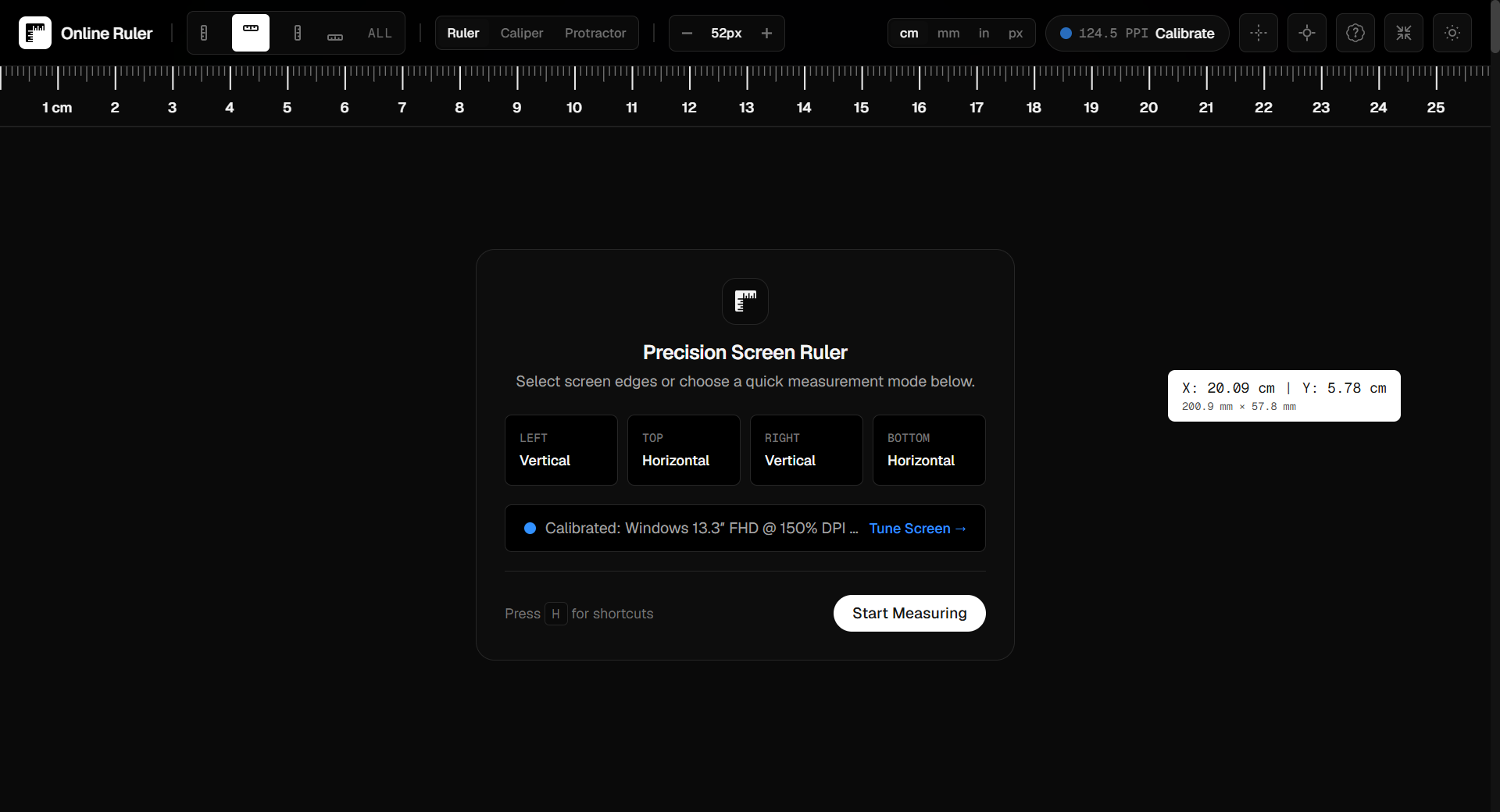
Rather than juggling four separate single-purpose sites, RulerGo combines all of the above into one free, browser-based tool:
- A calibrated on-screen ruler with top, bottom, left, and right edges, switchable between centimeters, millimeters, inches (with 1/16" fractions), and pixels.
- A digital caliper mode for drag-to-measure width, height, and diagonal bounding boxes.
- A 360° protractor for angle measurement with 0.1° graduations.
- A live unit converter synced to your calibrated screen PPI.
- Four calibration paths — auto-detect, device selection, screen diagonal, and credit card alignment — plus a Live Verify check against real coins and cards.
- No signup, no download, no ads, and everything runs client-side in your browser.
Choosing the Right Tool for Your Task
- Quick length check (fabric, paper, packaging) → a calibrated screen ruler.
- Width + height + diagonal in one motion (phone cases, bolts, PCBs) → a digital caliper tool.
- Angles (miter cuts, folded paper, drafting) → an online protractor.
- Converting between units on the fly → a live unit converter tied to your screen's real scale.
If you only bookmark one tool, pick one that does all four — it saves you from re-calibrating a different site every time your task changes.
FAQ
Are free online measurement tools actually accurate?
Only if calibrated. An uncalibrated tool relies on a generic pixel-to-inch assumption that rarely matches real hardware. A calibrated tool, verified against a coin or card, is accurate to a fraction of a millimeter.
Do I need to download anything for these tools to work?
No — the tools discussed here run entirely in the browser, on desktop or mobile, with nothing to install.
Is there a genuinely free option with no ads or signup?
Yes — RulerGo is free, ad-free, and requires no account to use any of its ruler, caliper, protractor, or converter features.